How to use
PHASEfilter package offers four main tools to the user.
PHASEfilter
With this tool it is possible to indentify heterozygous and loss of heterozygoty between two diplod references. It is also possible to set a threshold of heterozygous/homozygous variant base on Allele Deep (AD). A threshold to remove variants with low Allele freqeuncy is also available.
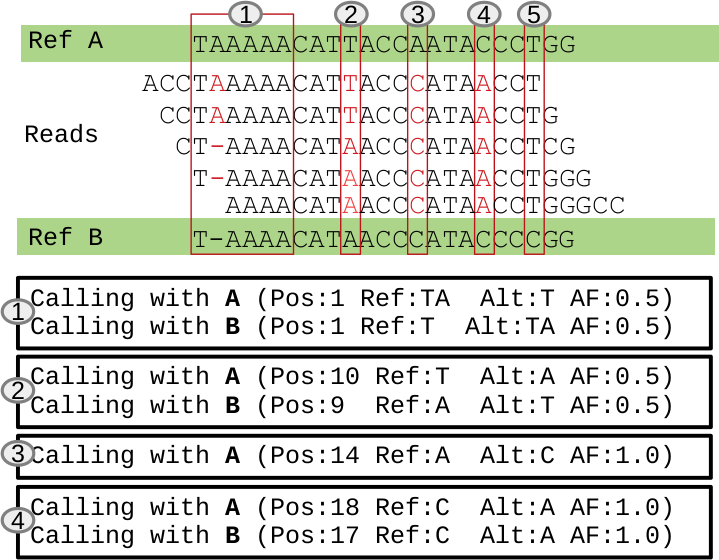
To classify variants it is always necessary to pass two VCF files, one for each reference phase. After that, the phasefilter will go through the variants called in reference A (ref1) and check if there are any homologous in the variants called in reference B (ref2). For each variant called in the reference A it can happen three situations:
both references, for the position in analysis, are equal and the variant is valid (situation 4 previous)
position is heterozygous in the reference and the variant reflects it, so the variant is removed (situation 1 and 2);
position is heterozygous in the references and the variant is homozygous, so the variant is valid but is also going to “loss of heterozygosity” (LOH) output (situation 3).
position is heterozygous in the references and there is no variant, because the VCF in analysis is the one called with reference A (ref1) (situation 5).
Most common use of the phasefilter:
1$ phasefilter --help
2$ phasefilter --ref1 Ca22chr1A_C_albicans_SC5314.fasta --ref2 Ca22chr1B_C_albicans_SC5314.fasta --vcf1 A-M_S4_chrA_filtered_snps.vcf.gz \
3--vcf2 A-M_S4_chrB_filtered_snps.vcf.gz --out output_dir
In the previous case there are four parameteres:
ref1 - has the fasta reference of the first form of species in analysis;
ref2 - has the fasta reference of the second form of species in analysis. It is the hit;
vcf1 - has he variants called from the ref1;
vcf2 - has he variants called from the ref2. It is the hit;
out - directory where the files will be saved;
Important
By default, heterozygous and homozygous form are defined by AC info for each variant. If AC = 1 is heterozygous, > 1 is homozygous. GATK adds this info tags at each variant, Loss Of Hetrozygous (LOH) is only detected if the VCF file ad the AC info tag for each variant.
Eighth possible files will be created after the commands ends. The outputs are from refrence A (ref1) to reference B (ref2), and from reference B (ref2) to reference A (ref1).
[A]_to_[B]_report.txt - has the statistics about the analysis;
valid_[A]_to_[B].vcf.gz - has all variants that are not heterozygous between two references;
removed_[A]_to_[B].vcf.gz - has all heterozygous variants;
LOH_[A]_to_[B].vcf.gz - has all variants that are loss of heterozygous between two references. This variants are also in ‘out_file.vcf.gz’ file.
[B]_to_[A]_report.txt - has the statistics about the analysis from ;
valid_[B]_to_[A].vcf.gz - has all variants that are not heterozygous between two references;
removed_[B]_to_[A].vcf.gz - has all heterozygous variants;
LOH_[B]_to_[A].vcf.gz - has all variants that are loss of heterozygous between two references. This variants are also in ‘out_file.vcf.gz’ file.
If your VCF files has the allele deep (AD) format it is also possible to pass two extra parameters:
threshold_heterozygous_AD - it is possible to define heterozygous/homozygous level define by Allele Deep counts, otherwise it is defined by Allele Count (AC);
remove_variants_by_AD_ratio - you can remove variants based on low Allele Frequency for each variant. The Allele Frequency it will be obtained by Allele Deep counts.
1## other possibility
2$ phasefilter --help
3$ phasefilter --ref1 C_albicans_SC5314_chrA_A22_chromosomes.fasta --ref2 C_albicans_SC5314_chrB_A22_chromosomes.fasta --vcf1 A-M_S4_chrA_filtered_snps.vcf.gz \
4--vcf2 A-M_S4_chrB_filtered_snps.vcf.gz --out output_dir \
5--threshold_heterozygous_AD 0.4 --remove_variants_by_AD_ratio 0.1
Note
If you pass a value to remove variants with low Allele Frequency, this value will be calculated with the counts that are in Allele Count (AC) in vcf file.
Important
The vcf file in analysis it is always the one in ref1 parameters,
phasefilter_single
This tool do as the same of the previous script but only analysis from Reference A (ref1) to Reference B (ref2)
Most common use of the phasefilter:
1$ phasefilter_single --help
2$ phasefilter_sinlge --ref1 Ca22chr1A_C_albicans_SC5314.fasta --ref2 Ca22chr1B_C_albicans_SC5314.fasta --vcf1 A-M_S4_chrA_filtered_snps.vcf.gz \
3--vcf2 A-M_S4_chrB_filtered_snps.vcf.gz --out_vcf A-M_S4.vcf.gz
In the previous case there are four parameteres:
ref1 - has the fasta reference of the first form of species in analysis;
ref2 - has the fasta reference of the second form of species in analysis. It is the hit;
vcf1 - has he variants called from the ref1;
vcf2 - has he variants called from the ref2. It is the hit;
out_vcf - has the file with with results: 1) passed variants; 2) heterozygous; 3) LOH variants;
Four possible files will be created after the commands ends:
<out_file>_report.txt - has the statistics about the analysis;
valid_<out_file>.vcf.gz - has all variants that are not heterozygous between two references;
removed_<out_file>.vcf.gz - has all heterozygous variants;
LOH_<out_file>.vcf.gz - has all variants that are loss of heterozygous between two references. This variants are also in ‘out_file.vcf.gz’ file.
If your VCF files has the allele deep (AD) format it is also possible to pass two extra parameters:
threshold_heterozygous_AD - it is possible to define heterozygous/homozygous level define by Allele Deep counts, otherwise it is defined by Allele Count (AC);
remove_variants_by_AD_ratio - you can remove variants based on low Allele Frequency for each variant. The Allele Frequency it will be obtained by Allele Deep counts.
make_alignment
Align two fasta files and creates a report with the alignment percentage. This tool also creates a ClustalX alignment file that is produced with the results of minimpa2 aligner. It accpets three mandatory parameters as two optinal parameters. Most common use of the make_alignment:
1$ make_alignment --help
2$ make_alignment --ref1 C_albicans_SC5314_chrA_A22_chromosomes.fasta --ref2 C_albicans_SC5314_chrB_A22_chromosomes.fasta --out report.txt
In the previous case there are four parameteres:
ref1 - has the fasta reference of the first form of species in analysis;
ref2 - has the fasta reference of the second form of species in analysis. It is the hit;
out - name for the report;
This tool has two extra parameters:
pass_chr - name or names of chromossomes to pass. Can be more than one separated by comma. It is the prefix of the chromossome that is necessary to pass;
out_alignment - folder name where an alignment will be save. It has ClustalX format.
1$ make_alignment --help
2$ make_alignment --ref1 C_albicans_SC5314_chrA_A22_chromosomes.fasta --ref2 C_albicans_SC5314_chrB_A22_chromosomes.fasta --out report.txt \
3--pass_chr chrI,chrII --out_alignment path_alignment
Note
Save the alignements take long time.
reference_statistics
Creates a report based on the number of bases that exists in the chromosomes present in fasta file. Most common use of the reference_statistics:
1$ reference_statistics --help
2$ reference_statistics --ref Ca22chr1A_C_albicans_SC5314.fasta --out report_stats.txt
In the previous case there are four parameteres:
ref - fasta file has sequences;
out - report name where will be saved the statistics;
synchronize_genomes
Synchronize two references and add two new fields (StartHit;EndHit) to GFF files with the positions of the second reference, the hit reference (ref2). For VCF files only adds (start_hit) to Info notations. It accepts 4 mandatory parameters and one optional. It is necessary to pass a VCF or a GFF file. Most common use of the synchronize_genomes:
1$ synchronize_genomes --help
2$ synchronize_genomes --ref1 S288C_reference_chr_names_cleaned.fna --ref2 S01.assembly.final.fa --gff S01.TE.gff3 --out result.gff
In the previous case there are four parameteres:
ref1 - has the fasta reference of the first form of species in analysis;
ref2 - has the fasta reference of the second form of species in analysis. It is the hit;
gff - has he variants called from the ref1;
out - has the file with passed variants, not heterozygous;
This tool has one extra parameter:
pass_chr - name or names of chromossomes to pass. Can be more than one separated by comma. It is the prefix of the chromossome that is necessary to pass;
1$ synchronize_genomes --ref1 S288C_reference_chr_names_cleaned.fna --ref2 S01.assembly.final.fa --vcf S01.TE.vcf --out result.vcf --pass_chr chrmt
2$ synchronize_genomes --ref1 S288C_reference_chr_names_cleaned.fna --ref2 S01.assembly.final.fa --vcf S01.TE.vcf.gz --out result.vcf.gz --pass_chr chr_to_pass
3$ synchronize_genomes --ref1 S288C_reference_chr_names_cleaned.fna --ref2 S01.assembly.final.fa --vcf S01.TE.vcf.gz --out result.vcf